One of the most common questions I get as an automation engineer is:
"Can we use AI to automate this?"
My answer is usually:
"Maybe... But is the process documented?"
Because before you can hand work off to an automation, an AI agent, or even another person, you need a clear definition of what the process actually is.
That's the step most people skip.
And it's the reason so many automation projects stall before they ever get off the ground.
Over the years, I've developed a simple five-step framework for turning a workflow into something that's actually ready for automation.
1️⃣ Identify the Right Process
When most people think about automation, they immediately jump to the biggest, most complicated part of their job.
Ironically, those usually aren't the best places to start.
The workflows that create the fastest wins tend to share a few characteristics:
🔁 Repeatable
The process follows a familiar pattern, even if the details change slightly from one run to the next.
📈 Frequent
The work is frequent enough that shaving off a few minutes here and there actually adds up.
🛑 Bottlenecks
The task sits in the middle of other work. When it gets delayed, other people end up waiting for it too.
One exercise I like is keeping a running list of everything I touch throughout the day. Not detailed documentation. Just a simple inventory.
What applications did I open? What tasks did I spend time on? What requests landed in my inbox?
After a day or two, patterns start to emerge.
You'll usually find a handful of tasks that keep resurfacing, follow a similar process every time, and consume more mental energy than they probably deserve.
Those are the processes worth documenting first.
2️⃣ Investigate How the Work Really Gets Done
This is usually the most time-consuming part of documentation.
Not because the process is complicated, but because capturing everything can be a pain. Screenshots, notes, instructions, recordings... it adds up quickly.
Over the years, I've found that the more I can automate the capture part of documentation, the more time I have to focus on understanding the workflow itself.
💡 One thing that's made this dramatically easier for me: Scribe.
Instead of documenting a process after the fact, I can have the subject matter expert run through the workflow while Scribe captures each step as they work. It automatically creates a step-by-step guide with screenshots and instructions, which means I'm not scrambling to take notes the entire time I meet with them.
When I'm documenting a process, there are three things I'm always paying attention to:
🤝 Handoffs
Where does the work come from, and where does it go next? Most processes involve multiple people, and those transitions are where confusion shows up.
🔐 Access
What systems, permissions, and roles does someone need to perform the work? A beautifully documented process isn't much help if the next person can't even get into the tools they need.
✅ Success Criteria
How do you know the task is actually complete? Teams often use words like "approved" or "reviewed," but those definitions aren't always as obvious as they sound.
3️⃣ Document the Process
One thing I've learned over the years is that a collection of workflow guides doesn't automatically become useful documentation.
What makes a SOP valuable is the context that connects everything together.
When I'm building a SOP, I usually include five sections:
📄 Overview
A short explanation of what the process is, when it happens, and why it matters.
👥 Roles & Responsibilities
Who is involved in the workflow and what each person owns.
🔑 Access Requirements
The tools, systems, and permissions someone needs before they can do the work.
🗺️ Process Map
A high-level view of how the workflow moves from one person to the next.
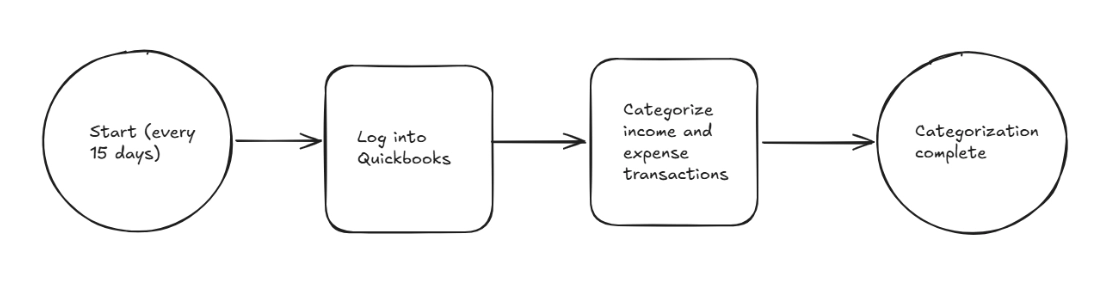
⚙️ Workflows
The step-by-step instructions and guides that explain how each part gets completed.
💡 One thing I really like about Scribe Pages is that it gives me a place to bring all of this together:
Instead of keeping workflows, diagrams, and notes scattered across different tools, I can organize everything into a single SOP. The process map, access requirements, roles, and individual workflow guides all live in one place.
That means someone can open one document and understand the process from start to finish, rather than hunting through multiple files trying to piece everything together.
And that's usually the difference between documentation that gets used and documentation that gets ignored.
4️⃣ Test Before You Trust It
This is the step people are most tempted to skip.
The SOP is written. It looks polished. You've spent hours putting it together. It's easy to assume it's ready.
But I've learned that the person who creates the documentation is usually the worst person to evaluate it.
Why?
Because you already know how the process works.
The real test is whether someone else can follow it successfully.
Give the SOP to a coworker, a new hire, or someone outside the team and ask them to walk through it.
You'll quickly find the gaps:
- Missing permissions
- Undefined terminology
- Unclear handoffs
- Assumptions that never made it into the documentation
Every time I've done this, I've found something that needed to be clarified.
A little testing up front saves a lot of frustration later.
5️⃣ Decide What (or Who) Takes It Over
Once a process is documented, you have options.
You can hand it to:
👤 A Person
A coworker, contractor, or new hire can pick up the work without relying on information that only lives in one person’s head or constant hand-holding.
⚙️ An Automation
Great for structured, predictable tasks where the same inputs consistently lead to the same outputs.
🤖 An AI Agent
A good fit when the work requires a little more flexibility, context, or decision-making than a traditional automation can handle.
What all three options have in common is that they require documentation first.
A new hire can't successfully take over a process they don't understand.
An automation engineer can't automate a workflow that only exists in someone's head.
And an AI agent can't reliably execute a process if nobody has clearly defined how that the process works.
This is why I recommend documenting processes before you're ready to invest in automation or AI.
Eventually, an automation engineer, AI engineer, or consultant is going to need that information anyway. The difference is whether you're paying them to figure it out from scratch, or handing them a well-documented process they can start building from immediately.
In the meantime, you still get value from the documentation. It helps onboard new team members, supports delegation, and makes your processes easier to improve.
And when you're finally ready to invest in automation or AI, you're not starting from zero. You're already halfway there.
💡 The Big Takeaway
When people talk about AI, the conversation usually starts with tools.
Which model should I use?
Which AI agent platform should I build on?
What's the latest thing everyone is trying?
But after years of documenting processes and building automations, I've found those questions usually come later.
The biggest challenge isn't choosing the right AI tool.
It's making your work understandable enough that someone else can do it.
Once your processes are documented, everything gets easier:
- Delegating work
- Onboarding new team members
- Improving processes
- Building automations
- Experimenting with AI agents
Documentation isn't the glamorous part.
But it's often the difference between an automation idea and an automation that actually gets built.
💡 As you've probably noticed throughout this newsletter, I build all of my documentation in Scribe.
It's become my go-to tool for automatically capturing workflows, building SOPs, and organizing process documentation.
If you'd like to see how it could work for your team, you can check it out at www.scribe.how/rowe and book a personalized enterprise demo.
🎬 Watch the Full Video
Feel free to check out the full video below with real examples of SOPs I have built 👇